type
Post
status
Published
date
Mar 10, 2026
slug
10-habits-double-claude-code-success-en
summary
From context management to harness design, 10 practical habits that eliminate context rot and dramatically improve your coding agent's success rate.
tags
Agentic Engineering
Harness Engineering
category
Agentic Engineering
icon
password
priority
3
A coding agent at minute 5 and the same agent at minute 35 are two entirely different things.

Chroma Research benchmarked 18 large models and found a counterintuitive result — the longer the context, the worse the performance. Not just near the limit, but from the very beginning. Liu et al.'s "Lost in the Middle" demonstrated it more concretely: when relevant information falls in the middle of the context, model performance drops by over 30%. In agent scenarios this problem is sharply amplified — every file read, every grep, every dead end stays in the context window. Context bloats like a memory leak, and model performance degrades along with it — this is context rot. Empirical data shows that doubling task duration quadruples the failure rate.
Phil Schmid put it well: "Most agent failures are not model failures anymore, they are context failures." CodeScene's research provides another hard number: agent success rate exceeds 60% on healthy code but drops to just 20% on unhealthy code — same agent, same prompt, 3x difference. Karpathy's shift from championing vibe coding to explicitly advocating agentic engineering reflects the same realization: unconstrained freedom does not scale — discipline does.
These 10 simple habits are that discipline. The examples use Claude Code, but the core principles apply to any coding agent. No complex systems to build, no toolchain changes required. Most agent users never bother with these fundamentals — applying them consistently is an outsized advantage.
The tips center on two themes: treating context like memory, and designing a harness for the agent. The latter is ultimately also about keeping context from exploding.
Treat Context Like Memory
The context window is the agent's working memory. Memory is not infinite — fill it up and the system stalls. The context window behaves the same way — past 50%, the model starts degrading, and costs start climbing. Most people's habit is waiting for automatic compression to trigger, like Java's Full GC — by the time it fires, it is already too late. The correct approach is not post-hoc compression but source control: never let context bloat to the point where compression is needed. The best GC is no GC at all.
The first three tips are manual memory management — when to free, how to persist state, what is already occupying memory. The next three are mechanism-level automatic management — keeping each allocation inherently small, with isolation and reclamation built into the workflow.
Tip 1: New Task, New Session
Finish a task,
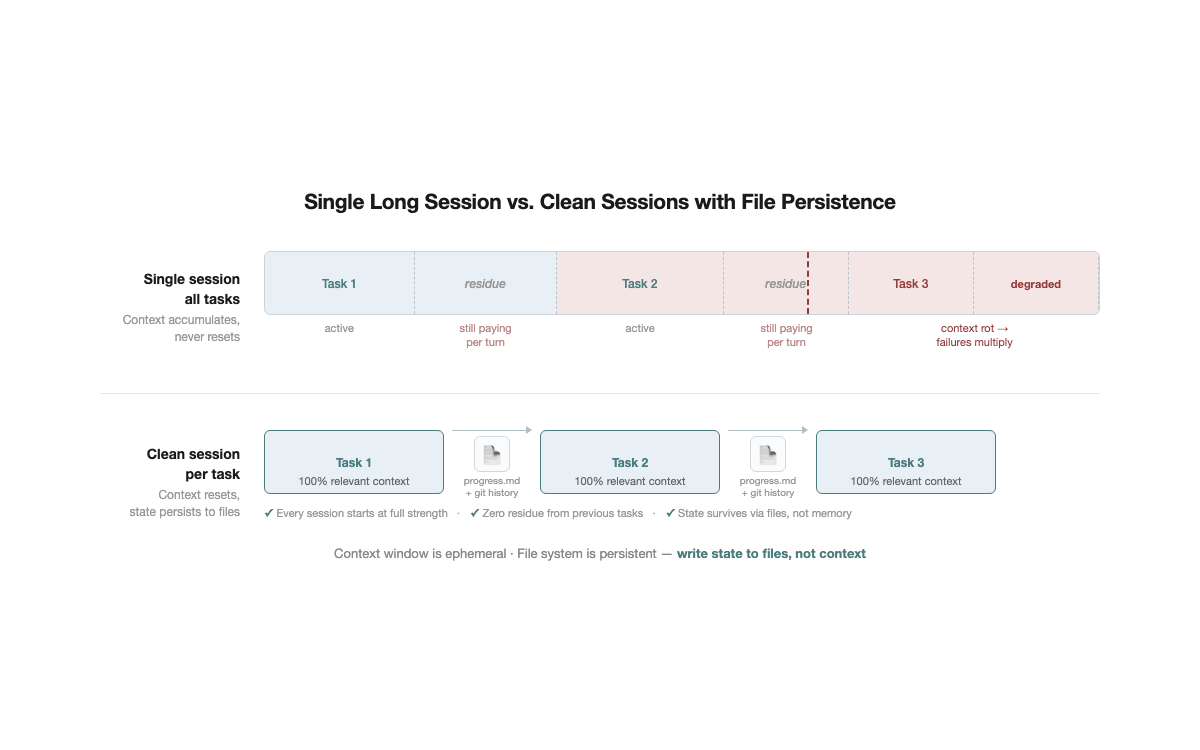
/clear, start the next one. That simple.No one opens a single browser tab and does 5 unrelated things in it. Yet many people use agents exactly this way — fix a bug, then write a new feature, then adjust configuration, all conversation history piling up in the same context window.
This has two direct consequences:
- Wasted money. Irrelevant tokens get reprocessed every turn. A 50K-token context with 30K tokens of residue from the previous task means paying for those 30K tokens on every interaction.
- Degraded model performance. Context rot kicks in directly. The more irrelevant information present, the more the model's attention scatters away from the current task, and output quality visibly declines.
Advanced: Restart after two failed corrections. If the agent gets something wrong and two correction attempts have not fixed it, stop trying in the current session. The context is already polluted — failed attempts, corrections, the agent's apologies — all noise.
/clear, spend 30 seconds writing a more precise initial prompt, and start fresh. In most cases, the first attempt in a clean context outperforms the fifth correction in a polluted one.Fallback:
/compact <directive>. If clearing the session is not an option (for instance, the task is still in progress), at least do targeted compression rather than bare /compact. For example: /compact focus on API changes, discard debugging process. A rule can also be added to CLAUDE.md: "When compressing, always preserve the list of modified files and test commands" — ensuring critical information survives even when compression triggers.Persisting state across sessions: progress.md. After clearing context, a natural question arises: does that not lose all state? A task half-done in the morning — how to continue in the afternoon? The answer is writing state to files. Update progress.md at the end of every session — current status, key decisions, next steps. The next session reads this file and recovers context in 3 seconds. No need to maintain long sessions to "remember" progress. Git history is a natural complement — commit messages plus diffs let a new session quickly understand "what was done and why." Files record intent; git records facts. The context window is ephemeral; the file system is persistent — write state to files, and every session starts at full strength.
This is the lowest-cost quality improvement available. No tools required, no configuration changes, can be started today.
Tip 2: Write a Good CLAUDE.md
CLAUDE.md handles project-level persistent knowledge — coding standards, architecture conventions, workflows. If Tip 1's progress.md is GPS positioning, CLAUDE.md is the map.
CLAUDE.md is essentially a system prompt. But system prompt influence decays as conversation lengthens — by 50K tokens, the initial CLAUDE.md has been diluted by large volumes of tool output. Every line must serve agent decision quality. No filler, nothing the agent already knows.
What to include:
1. Project structure map (highest priority). The biggest time sink for agents is "not finding things." Tool output accounts for 70–80% of context, much of it from the agent searching aimlessly through the project. Include only information that cannot be inferred from file names:
`markdown
- src/models/ — recommendation models, core file is ranking_model.py
- src/features/ — feature engineering, feature_config.yaml defines all features
`
2. Tool selection decision tree. Agents default to global grep searches — notably inefficient. Provide guidance anchored to observable features:
looking for config? go to configs/, looking for feature definitions → check feature_config.yaml first.3. Project-specific conventions and pitfalls. Things agents cannot infer from code:
changing embedding_dim requires syncing model_config.yaml. One rule saves an hour of debugging. Anthropic's RL Engineering team offers a useful reference — their CLAUDE.md contains only concrete prevention rules: run pytest not run, don't cd unnecessarily — just use the right path. No vague principles, only rules targeting mistakes the agent actually makes.4. Workflow directives. Encode planning/execution separation:
for multi-file changes: list the change plan first, confirm, then execute. This prevents agents from discovering conflicts mid-implementation.What to leave out:
- General language/framework knowledge. Claude already knows it. Including it wastes tokens and accelerates attention decay.
- Overly detailed API documentation. CLAUDE.md is not a reference manual.
- Vague principles. "Write high-quality code" provides zero decision support for agents.
- Historical changelogs. This is not a CHANGELOG. Keep only currently valid information.
- Coding style preferences. Agents already have sound defaults for mainstream conventions. Listing style preferences line by line is low-ROI context overhead.
- Duplicated configuration. If it is already in pyproject.toml, do not repeat it.
Progressive disclosure: layer information, rather than dumping everything upfront. A longer CLAUDE.md is not a better CLAUDE.md — every additional line consumes context space the agent needs for the actual task. Practices from Anthropic's internal teams reveal a shared pattern: the most effective CLAUDE.md files are layered.
- Keep top-level CLAUDE.md to entry-point information only — project structure, core conventions, key paths. Detailed workflows, API usage guides, and domain playbooks go into separate files, referenced by path from CLAUDE.md. The agent reads them when needed; when not needed, they consume zero context
- Wrap repeated instructions into commands. Anthropic's Security Engineering team contributed 50% of all custom slash commands in the entire monorepo — encapsulating frequently used workflows as commands rather than writing them as lengthy CLAUDE.md directives. Commands load only when invoked; zero context cost when idle
The core idea resembles good API design — a concise surface with details available on demand. CLAUDE.md is an index, not an encyclopedia.
Organizing principle: Keep it under 200 lines. Put high-frequency information first. Use imperative sentences — "check xxx first" rather than "it is recommended to check xxx first." Actionable always takes priority over explanatory.
Tip 3: Know What Is Already in Your Context
The prerequisite for managing memory is knowing what is in it.
Opening a new session, the context window is not empty. CLAUDE.md, MCP server definitions, installed plugins and skills, tool schemas — all of these occupy context space before you issue a single instruction. The
/context command reveals the full composition of the initial context: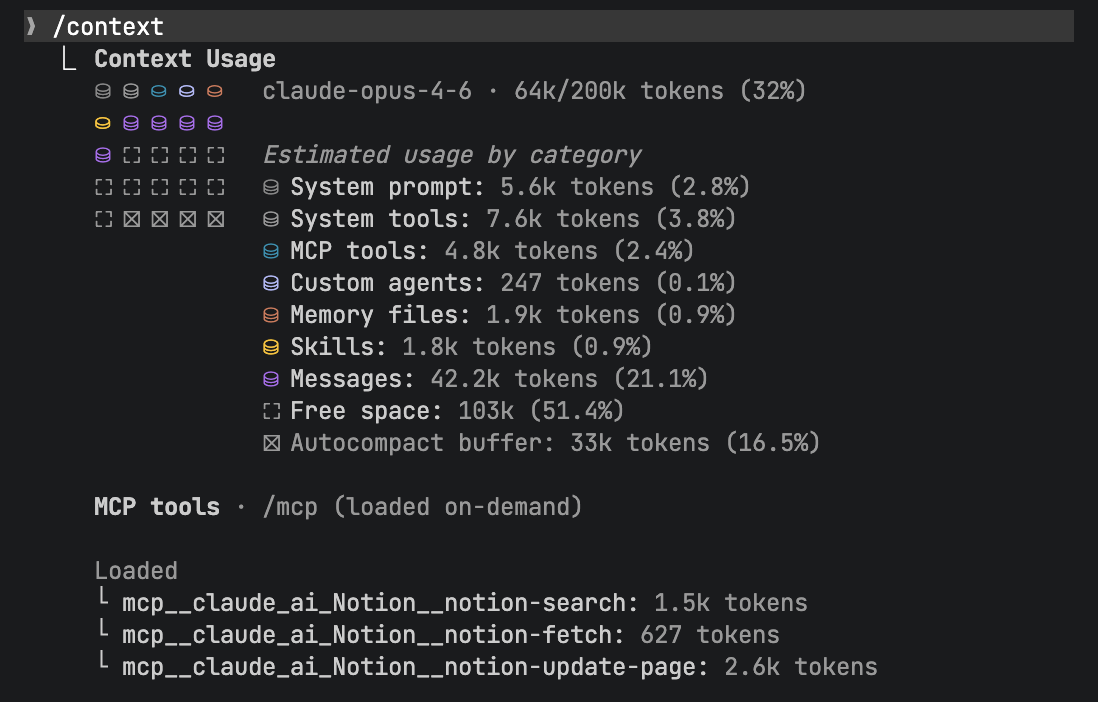
This matters because the effective capacity is not the nominal 200K tokens. As noted earlier, performance degrades past 50%. If initialization already claims 30%, the effective workspace is only 20% — the model starts degrading substantially faster than expected.
Practical recommendations:
- Load on demand, not upfront. Every MCP server, plugin, and skill consumes context. A dozen MCP server tool definitions may claim tens of thousands of tokens. Install only what the current project genuinely requires; enable the rest on demand
- More tools means more noise. The model must choose from all available tools at every step. Irrelevant tools are not merely wasted space — they are decision noise, increasing the probability of the model selecting the wrong tool
- Audit periodically. Projects change, workflows evolve, but MCP servers and plugins tend to accumulate without cleanup. Use
/contextregularly to review and remove what is no longer needed
This follows the same principle as Tip 2's progressive disclosure: more information is not better — more precise information is. Every additional token of initial context compresses the effective workspace for everything that follows.
Tip 4: Decompose Tasks — Keep Each One Minimal
One task does one thing. The larger the task, the more context bloats, and the higher the failure rate.
This is not intuition — it is data. According to METR's benchmark of agent coding tasks, doubling task duration quadruples the failure rate. Context bloat is the primary cause — tool output, failed attempts, and intermediate state all accumulate, and the model sinks deeper into its own noise.
The core approach is not "compress context after the fact" but "keep tasks small enough that compression is never needed." A task completable in 2–5 minutes never gives context time to bloat. The agent receives clean instructions, completes one thing, delivers, and exits.
Dynamic decomposition outperforms static decomposition. Anthropic's Building Effective Agents notes that for coding tasks "you cannot predict which subtasks will be needed," recommending an orchestrator for dynamic decomposition rather than predefined workflows. The logic is straightforward: do not plan 10 subtasks upfront and execute them linearly. If step 2 reveals a flawed assumption, steps 3 through 10 are all invalidated. The better approach: plan only the next step, then decide the following step based on results. Each subtask's output becomes the input condition for the next — every step is grounded in the latest information rather than a potentially outdated plan.
A concrete example. Ask an agent to "add user authentication to the project." It enters plan mode first — reads dependencies, checks docs, evaluates options, writes the plan to plan.md. Step one is integrating an OAuth library. Upon completion, the agent discovers the library's API changed completely in its latest version. A static 10-step plan would have the remaining 8 steps all invalidated. With dynamic decomposition, the agent replans the next step based on the actual API — every step's input is the real output of the previous step, not an assumption made minutes ago.
Granularity test: Can the task's goal and verification criteria be stated in one or two sentences? If describing it requires "then... then... then...", it is too large. Decompose it.
Automated decomposition: Superpowers is an open-source skills framework for Claude Code that codifies this decomposition workflow — a skill automatically breaks a large task into 2–5 minute feature tasks, then dispatches sub-agents to execute each one independently. You do not have to decompose manually; the skill does it for you.
Tip 5: Sub-agents for Context Isolation
Tip 1 describes manual
/clear. Sub-agents are the automated upgrade.The mechanism is straightforward: the main agent dispatches a subtask to a sub-agent, which executes in an independent context window. Tens of thousands of tokens of exploration — searching files, reading code, trial and error — get compressed into a 1,000–2,000 token structured summary returned to the main agent. The main agent's context stays clean.
No need to manually judge "time to /clear" — task boundaries naturally become context boundaries.
Claude Code has three built-in sub-agent types:
- Explore (Haiku model): Read-only. Searches the codebase, locates files, understands structure. Low cost, fast.
- Plan (inherits main model): Read-only. Analyzes problems, formulates approaches. Uses the main model's reasoning capability without modifying code.
- General-purpose (all tools): Read and write. Executes complex multi-step tasks.
Best practice: Use Explore or Plan for read-heavy tasks, general-purpose for tasks requiring code changes. One sub-agent per clear objective, no more than 3–4 total. Sub-agents are not better in larger numbers — each has scheduling overhead, and splitting too finely wastes more than it saves.
You do not need to dispatch sub-agents manually — many commands already do it for you. Claude Code's built-in
/simplify is one example: it automatically dispatches a sub-agent to review code you just changed, checking for reuse opportunities, code quality issues, and efficiency problems, then fixes them in an isolated context. You type one slash command; the context isolation, task dispatch, and result aggregation all happen automatically. The same applies to batch plan execution — each subtask gets its own independent agent, completes, returns a summary, and the main agent's context stays clean.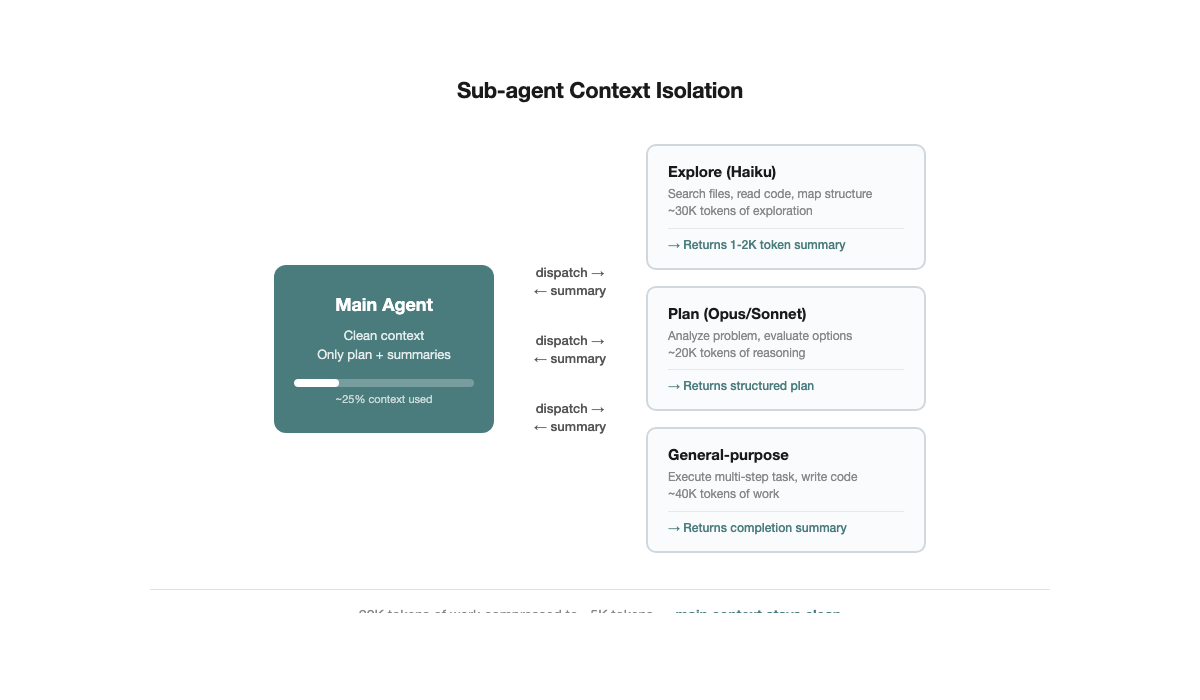
Advanced: Writer-reviewer separation. One agent writes code, then dispatches an independent sub-agent to review it. The sub-agent had no part in the implementation — its context contains only the code under review and project conventions. No trial-and-error history, no psychological attachment to design trade-offs, no confirmation bias by construction. This is the most intuitive application of sub-agent context isolation: writer and reviewer are physically separated at the context level, with no need to rely on self-discipline for objectivity.
Tip 6: Use Plan Mode to Think Before Acting
Claude Code has a built-in Plan Mode (toggle with Shift+Tab). When active, the agent only thinks — it searches code, reads documentation, analyzes dependencies, but writes no files.
Why Plan Mode matters. By default, agents "think and act simultaneously" — they start modifying code halfway through reading, discover the approach is wrong, roll back, and try again. Each failed attempt pushes thousands of tokens of tool output into context. Plan Mode separates thinking from doing: explore thoroughly first, form a complete approach, then execute in one pass.
How to use it:
- Enter Plan Mode and describe the objective. For instance: "I need to add OAuth authentication to this project — research the options." The agent searches the codebase, reads dependencies, evaluates alternatives, but modifies no files
- Review the plan, then execute. Switch back to execution mode (Shift+Tab again) and the agent proceeds with the confirmed plan. Direction is settled; execution rarely goes off track
- For complex tasks: write the plan to a file, then execute in a fresh session. If the exploration phase has consumed substantial context, have the agent write the plan to
plan.md, then/clear. A new session reads plan.md and executes. The executor's context contains only the plan itself — no residue from the exploration process
Core value. Plan Mode is "measure twice, cut once." Without it, agents frequently "start cutting before they finish measuring" — a wrong cut means starting over, wasting fabric (context). Plan Mode ensures the agent fully understands the problem before making changes, substantially reducing trial-and-error and rollbacks during execution.
Design the Harness
The first six tips directly manage context — clearing sessions and persisting state, writing good CLAUDE.md files, auditing initial context, decomposing tasks, using sub-agents, and Plan Mode. The next group takes a different angle: rather than managing context manually, use harness design (tests, hooks, code quality, scaffolding) to systematically prevent context from exploding.
Tip 7: Red/Green TDD
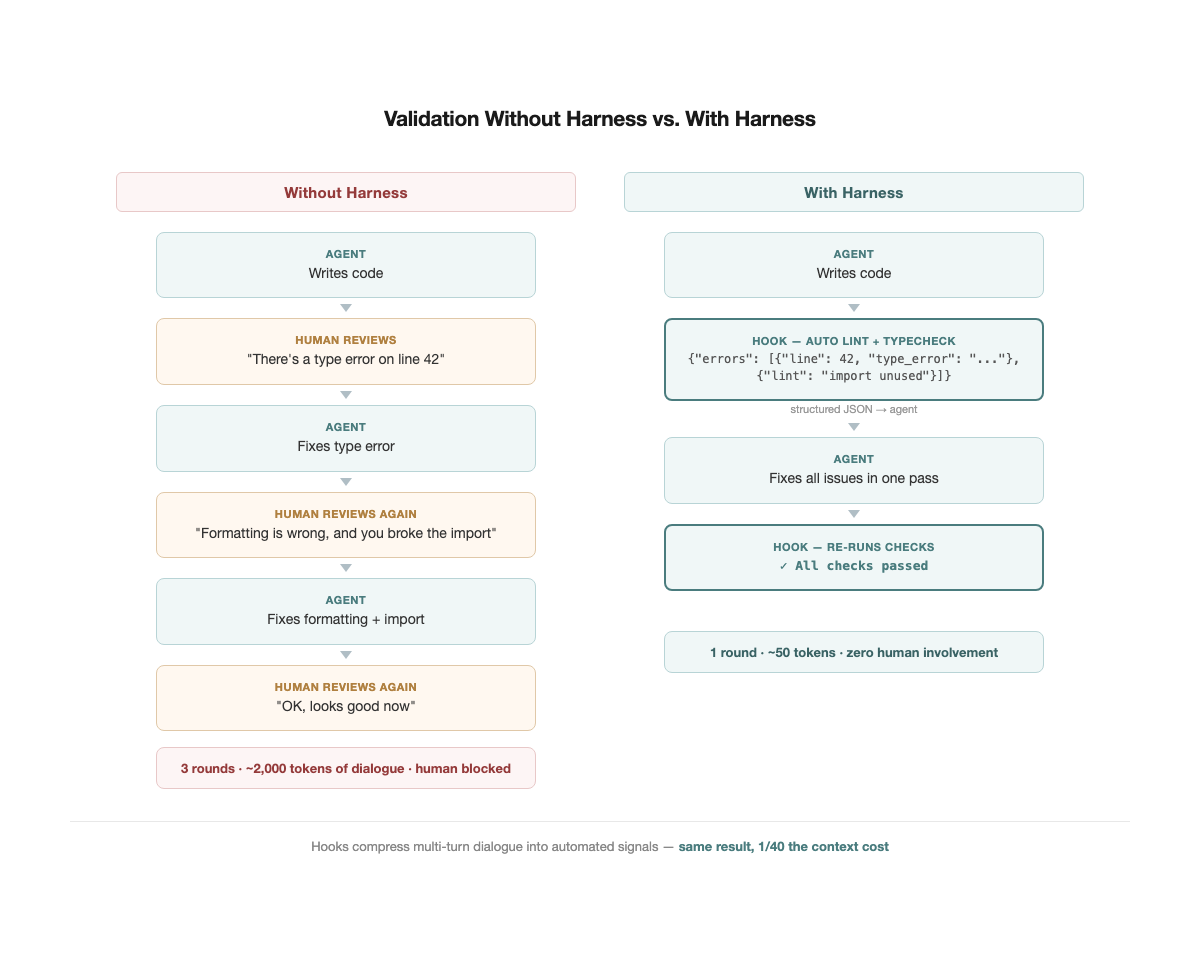
An agent workflow without tests looks like this: the agent writes code, asks "is this correct?" Review it, say "no, this part is wrong." It revises, asks again. After three rounds, the context is stuffed with thousands of tokens of back-and-forth — and all those tokens essentially communicated a single signal: pass, or fail.
Tests compress that signal to its minimum. A pass/fail occupies a few tokens yet is more precise and less ambiguous than several hundred words of natural language description.
Simon Willison wrote specifically about the Red-Green TDD pattern in Agentic Engineering Patterns. The core workflow is three steps:
- Red: Write a failing test first. Have the agent write the test, spend 30 seconds scanning it to confirm the intent is correct, then run it to confirm it fails. This step defines "what success looks like."
- Green: Let the agent implement until the test turns green. The agent has a clear objective function — not "write a good implementation" as a vague directive, but "make these 5 tests pass."
- Verify: Confirm the test actually went from red to green. If the test was green from the start, the test itself is flawed — it validated no new behavior.
Why does this pattern matter particularly for agents? Willison identified two agent-specific risks: producing code that does not work, and producing code that nobody needs. Red-Green TDD addresses both simultaneously — tests define what is needed (preventing over-generation), and pass/fail validates whether it works (preventing incorrect output).
Tweag's Agentic Coding Handbook provides a more specific workflow: write tests first, review the tests, then let the agent implement. Tests are the executable version of requirements — the agent does not need to repeatedly ask "is this what you mean?" It runs the test and knows.
As projects grow, the value of tests increases exponentially. Every new change risks breaking existing functionality, and the test suite is the only reliable safeguard. Agent projects without tests grow increasingly fragile; agent projects with tests grow increasingly robust.
This circles back to the article's core theme: context is scarce. Without tests, validation happens through conversation, and context bloats. With tests, validation completes automatically, conversations stay short, and context stays lean. TDD is not just a code quality tool — it is the agent's most efficient self-verification mechanism, transmitting the most accurate feedback with the fewest tokens.
Tip 8: Use Hooks for Programmatic Feedback
TDD addresses "does the code behave correctly?" But there is another class of issues that is more mechanical — type errors, formatting violations, lint warnings. These do not require tests to catch, but if corrected through manual conversation, they bloat context just the same.
Hooks are deterministic automated feedback loops. Claude Code's hooks mechanism allows scripts to run automatically before or after key agent actions — writing files, running commands, committing code. The most common pattern: a PostToolUse hook runs lint and typecheck after every file edit, returning errors as structured JSON directly to the agent. The agent fixes issues immediately, no human conversation needed — zero dialogue, near-zero context growth.
This operates on the same logic as TDD but at a different layer. TDD validates behavioral correctness ("does the feature work?"), hooks validate mechanical correctness ("are types correct? is formatting right?"). Both compress signals that would otherwise require multi-turn human conversation into a few automated tokens.
Hooks also handle post-compaction recovery. As noted earlier,
/compact loses information — another form of context rot. The community has developed mature solutions: hooks that detect compaction events and automatically re-inject critical information (re-reading progress.md, reloading current task context). No need to manually remind the agent "where were we?" after every compression — the hook handles it.Practical recommendations:
- Minimum viable hook: A single PostToolUse hook that runs
eslintormypyafter Write/Edit and returns errors. This one hook eliminates substantial formatting and type-related dialogue.
- Post-compaction recovery: Use a hook to detect compact events and auto-inject "current task status + list of modified files." Combined with Tip 1 (progress.md), context recovers quickly even after compression.
- Pre-commit gate: Automatically run tests before
git commit, blocking on failure. The agent does not need to remember "run tests before committing" — the environment remembers for it.
- Intercept dangerous commands: Agents occasionally run destructive operations like
rm -rf,git push --force, orDROP TABLE— this is not a theoretical risk. A developer already lost an entire home directory, and Replit's AI agent wiped a production database during a code freeze. A PreToolUse hook can pattern-match commands before execution, blocking dangerous ones and returning a warning.
- Intercept blocking commands: Some commands hang the agent — interactive prompts, processes waiting for input. Even one accidental invocation wastes an entire session. Use a hook to detect these patterns and block them outright.
Core principle: do not rely on the agent's memory — rely on the environment's determinism. Hooks are deterministic. They execute every time, regardless of how bloated the context has become.
Tip 9: Code Health Directly Determines Agent Success Rate

Tests solve the validation problem. But there is a more foundational factor: the quality of the codebase itself.
The 3x gap mentioned in the introduction — 60% agent success rate on healthy code, 20% on unhealthy code — traces directly back to context rot. Unhealthy code means more implicit dependencies, longer functions, more ambiguous interfaces. The agent must read more files to understand context and take more wrong turns to find the correct modification point. Context bloats, the model degrades, failure rates climb.
This redefines technical debt. The traditional argument — "technical debt hurts developer experience" — is a soft claim, easily deprioritized against business objectives. But now technical debt directly affects the ROI of AI tools — it becomes a quantifiable hard metric. Code health dropping from 7 to 5 may cause agent success rates to fall from 50% to 20%. This is not code aesthetics — it is productivity loss.
CodeScene's research also found that unconstrained AI coding increases defect risk by over 30% — agents tend to "move complexity around" rather than genuinely simplify. Code health is not a one-time effort; it requires ongoing maintenance.
How to do it:
- Identify Brain Methods: God functions spanning hundreds of lines — high cyclomatic complexity, deep nesting, tight coupling. These are where agent failure rates peak. Open a dedicated session, have the agent break them into small cohesive units, and run tests after each extraction.
- Run code health checks before every PR: CodeScene offers an MCP Server that plugs directly into Claude Code; alternatively, use lint rules to cap function length and complexity. The key is making "health regression" an automated gate rather than something caught in manual review.
- Separate refactoring from feature work: Do not add features and refactor in the same session. Refactoring is an independent task — clear session, do it alone, run tests to confirm nothing broke, commit. Then open a new session for the feature.
Giving the AI a clean codebase matters more than giving it a better prompt.
Tip 10: Build Frameworks and Scaffolding — Reuse Rather Than Regenerate
Code health is passive infrastructure — keep the codebase clean, and agents naturally perform better. But there is a more proactive approach: build tools for the agent.
A common waste: every time the agent handles a similar task, it generates a solution from scratch. The generation itself consumes context, the output quality is inconsistent, and verification is still required. If the same workflow has run three times, why not solidify the validated version?
Core logic: Transform repeated generation into direct invocation. When an agent calls an existing script, context usage may be 1/10 of generating from scratch, and output quality is more stable — because the tool itself has already been validated.
Practical approaches:
- Wrap validated usage into scripts. Your project has an in-house component library or a set of complex deploy/release commands. Every time the agent needs them, it reads API docs, fumbles through a few rounds of trial and error — each round burning thousands of tokens. Have the agent wrap the validated usage into a reusable script or function. Next time, it calls the script directly — faster execution, leaner context.
- Turn "how to do X" into a tool. Any workflow the agent keeps figuring out from scratch — deploys, releases, data migrations — is worth turning into a runnable script. It does not need to be polished; a working script beats regenerating from scratch every time.
- Skills/Commands system: Claude Code's skills/commands embody this idea — solidify workflows into reusable commands that agents execute directly.
CLAUDE.md and scaffolding are partners. CLAUDE.md tells the agent "which tools to use, which rules to follow." Scaffolding is the actual toolbox the agent can call. The former is the manual; the latter is the toolkit.
The OpenAI Codex team articulated a core insight: the bottleneck is never the agent's ability to write code — it is the lack of structure, tools, and feedback mechanisms surrounding it. This is not theory — their team of 3 engineers wrote zero code by hand and used agents to produce 1 million lines of code across roughly 1,500 PRs in about 1/10 of the normal time. The key lesson was not better prompts: "When Codex got stuck, they treated it as an environment design problem." Building the right environment for the agent matters far more than crafting the right prompt.
From Writing Code to Designing Environments
These 10 habits reduce to a single sentence: the job is no longer writing code — it is designing an environment where agents can work effectively. Manage context, build the harness — tests compress manual validation into pass/fail, hooks automate mechanical checks, a clean codebase reduces wrong turns, and scaffolding turns repeated generation into direct invocation.
None of these are complex. New sessions, writing files, running tests — not one requires building a complex system. Yet most people do not bother. Those who do are already operating differently.